 HertzKit MUSIC TOOLS
HERTZKIT / AUDIO PRACTICE
Mono, stereo and phase: check your mix
Check what changes when you hear your mix in mono and distinguish normal differences from problematic cancellation.
On this page6 sections
Check what survives the mono sum
Three treatments of the same signal. Play one and switch to the mono sum during playback. C deliberately cancels: the silence demonstrates summing rather than a player fault.
Playback only; the downloaded WAV retains both channels.
Choose a version to play.
Save prepared fileFirst listen: A remains when you switch to mono. In B, listen for the change in tone, particularly in higher notes and attacks. C is an extreme case: right is exactly the negative of left, so (L + R) / 2 equals zero.
Apply it: a real mix may lose just one instrument or part of its spectrum. Listen for a loss that matters to the arrangement. Check duplicated tracks and stereo effects one at a time; reversing polarity cannot fix every delay. Downloads retain the selected stereo WAV regardless of the playback button.
How the comparison was made
A places the same mono signal in both channels. B delays the right channel by 29 samples at 44.1 kHz, approximately 0.66 ms. C reverses the right-channel sign. All three retain the same channel gain. The mono sum is not loudness-matched: the change is part of the exercise.
HertzKit material under CC0. Provenance, settings and permission · TXT
Two channels do not guarantee width
A stereo file has two channels; if both carry exactly the same signal, it sounds centered. Width comes from differences between them. Before using a widening effect, listen to what it adds to the song and where the main elements sit. A wider mix is not automatically better.
What can disappear when summing?
The mono sum used by HertzKit’s converter is (L + R) / 2. If R is exactly the negative of L, the sum is zero: an example of cancellation from opposite polarity. Polarity inversion changes the sign; a delay-based phase difference depends on frequency and can produce comb filtering. These are related phenomena, but they are not the same control.
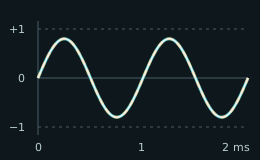
The mono sum retains the sine wave.
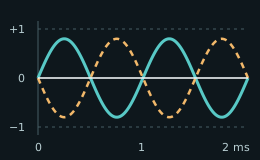
The two channels cancel completely.
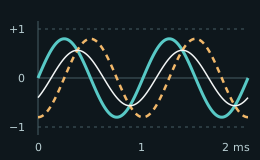
A 0.25 ms delay changes this 1 kHz sine wave’s sum.
Constructed sine waves at 1 kHz; equal time and amplitude scales. Teal: left. Dashed amber: right. White: (L + R) / 2. In the first plot all three overlap. A delay affects each frequency differently; these plots do not measure your mix.
A practical check
Keep the stereo original. For a first check, open Mix review, load your file and start playback. Toggle Listen in mono to compare the same passage without creating another file. Playback volume and mono listening do not change the analysis or the original audio.
Listen for a vocal, bass or effect unexpectedly losing presence. Check stereo effects, delays and duplicated tracks one at a time. Some differences are normal; focus on losses that affect the arrangement and check on more than one playback system. To keep a separate mono file, use the converter and check the export. Mono listening does not correct phase or automatically align tracks.
Put the idea into practice
Reference for further reading
You can continue with hear EQ changes.